

Apply, keep the record, hand it in — all in one place
Write a tailored résumé and cover letter for every job. Each one you send lands in your monthly record automatically: the official form 716.007 filled in, every field ready to copy into Job-Room, and the documents your adviser asks to see.
The filled form 716.007 is free. No credit card to start.
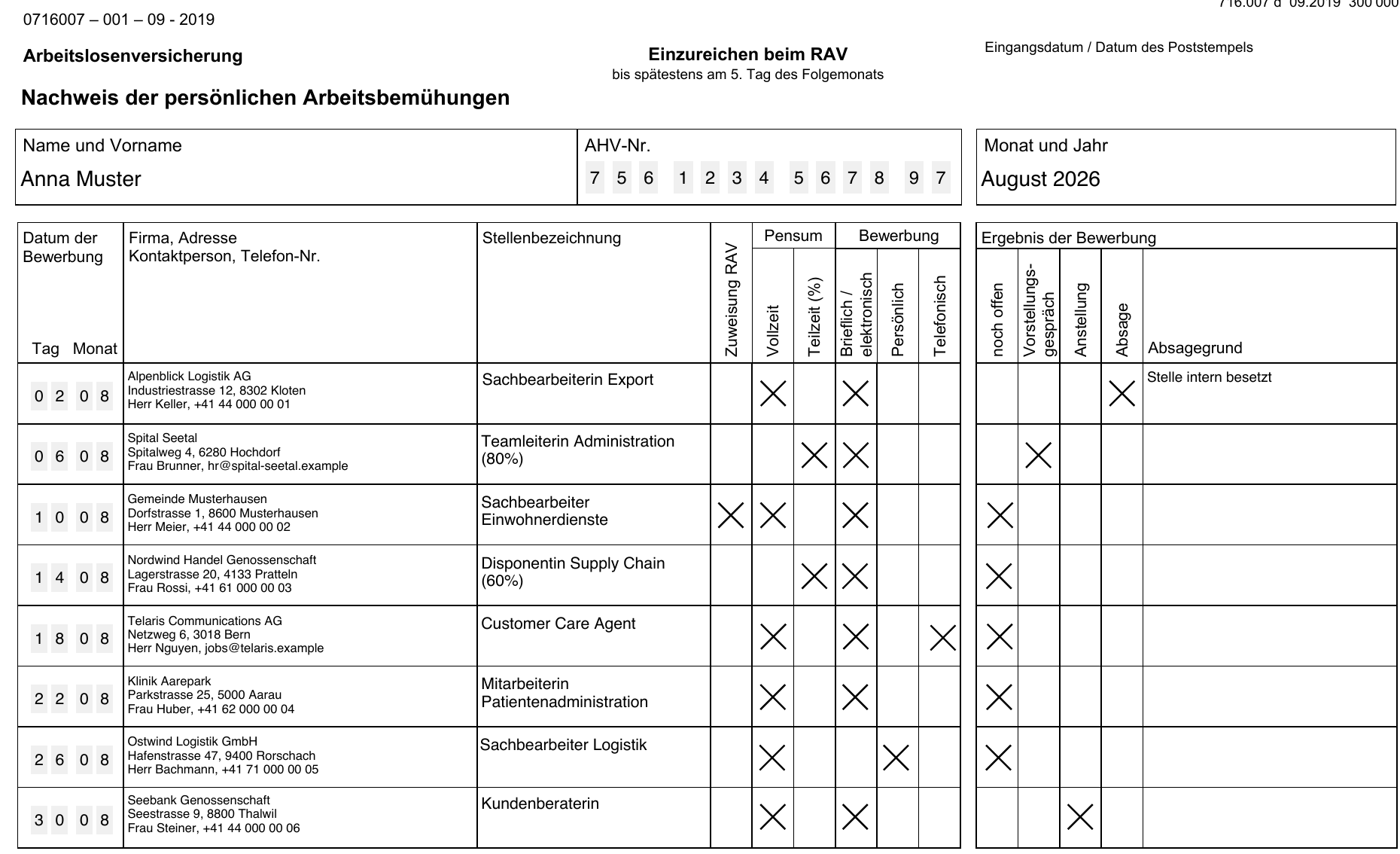
- Official SECO form 716.007
- Fields in Job-Room order
- Deadline: the 5th of the next month
- German, French and Italian
How a month works
Three steps, and the record writes itself while you apply.
Apply with a tailored résumé and letter
Paste the posting. The AI tailors your résumé to it and drafts the cover letter, in the Swiss format your adviser expects: A4, photo, grouped skills, ss instead of ß.
Every sent application joins the record
Mark an application as sent and it appears in the month with date, company, position and result. Add the contact person, address, workload and how you applied in a few clicks.
Hand it in by the 5th
Download form 716.007 filled in, sign it and send it to your adviser. Or copy each field into Job-Room — the record is ordered exactly like its entry form.
Built for the RAV record
Everything the 'Nachweis der persönlichen Arbeitsbemühungen' needs, without a spreadsheet and without typing the same thing twice.
The official form, filled in
Not a look-alike: the government's own PDF with your applications in its cells, so it is accepted everywhere, including Canton Zürich. Fourteen rows per copy, more months just repeat the form.
One copy away from Job-Room
Job-Room has no import. Your month is listed in the exact order of its entry form — date, method, company, address, contact, position, assignment, workload, result — each value with a copy button.
Evidence folder for the meeting
Your adviser can ask to see the letters behind the list. Download the month's résumés and cover letters as one ZIP, one folder per application, numbered like the form.
What is still missing, at a glance
Each application shows which RAV fields are still empty. Fill them from the application itself or straight from the month view.
German, French or Italian
The form comes in the three official editions. Pick the language of your RAV, ORP or URC at download time.
Your AHV number stays with you
It is typed when you download and written only into that PDF. It is never stored. Data is hosted under GDPR and the Swiss nDSG.
And everything else for the job search
The RAV record sits on top of a complete application toolkit.
AI résumé builder
Draft the summary, sharpen every bullet point, suggest skills — in minutes, in a live preview.
Swiss résumé templates
Thirteen recruiter-tested designs with a Switzerland profile: A4, photo, date of birth, grouped skills with levels.
Tailored to each posting, past the ATS
A match score for every job and one-click tailoring that mirrors the posting's language without inventing experience.
Cover letters in your words
A letter per application, in the formal register of your language, with Swiss closings and spelling.
Application tracker
Saved jobs, drafts, sent, interview, offer, rejected — the pipeline that feeds the RAV record.
Interview preparation
Questions matched to the role and company, with notes on how to answer them.
Questions job seekers ask
How many applications does the RAV expect per month?
Your adviser sets the number with you. Cantonal norms are close together: Zürich says typically 10 to 12, Bern at least 8, Basel-Landschaft 8 to 10. The duty starts during your notice period, not on your first day of unemployment.
When is the record due?
For each calendar month by the 5th of the following month. Late records are not counted unless there is a valid excuse. The month view opens on the previous month until the 5th has passed.
Is my own list or spreadsheet accepted?
Not reliably. Canton Zürich accepts only the official form 716.007 or Job-Room; other cantons vary. That is why we fill the official PDF itself instead of printing our own layout.
Do I have to hand in the letters and CVs too?
Not with the monthly form. You must keep them and show them on request, usually at the counseling meeting. The evidence ZIP gives you exactly that folder for the month.
Can you submit to Job-Room for me?
No. Job-Room has no import and no interface for job seekers, so entries are typed by hand. We make that fast: the month is listed in Job-Room's field order with a copy button on every value.
What is free?
Building your résumé, tracking applications and downloading the filled form 716.007 are free. PDF exports of résumés and cover letters, including the evidence ZIP, are part of the paid plan.
What happens with my AHV number?
You type it when you download the form and it is written into that PDF only. We never store it.
resume.coffee is an independent product and not affiliated with SECO, the RAV or the cantonal employment offices. You remain responsible for submitting your record on time.